


Ultimate Rider:Traffic Bike 3D
0.00.00 Reviews
App Specs
- Version
- 1.2.5
- Updated On
- License
- Free
- Downloads
- 1,000,000+
- Developer
- Happy Run
- Categories
- Simulation
- Platform
- Android
Screenshots
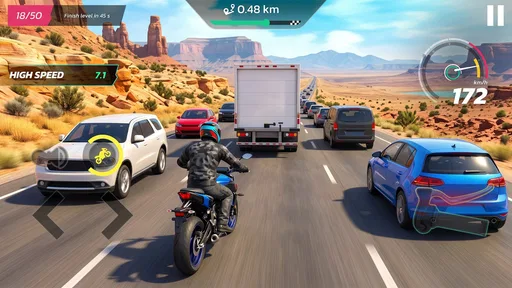
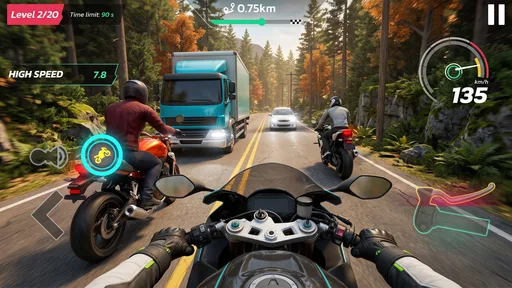
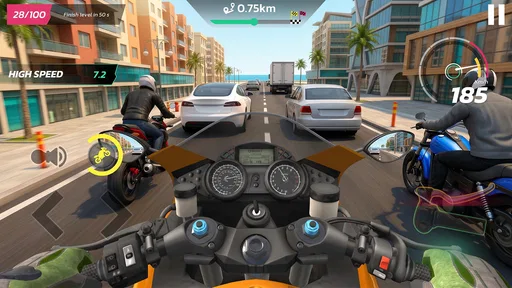
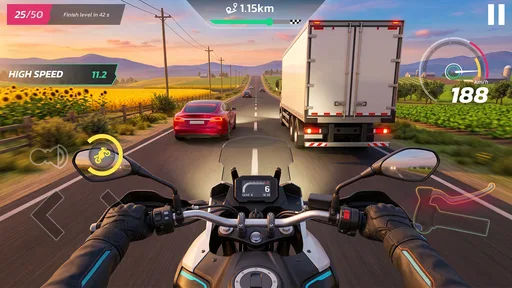
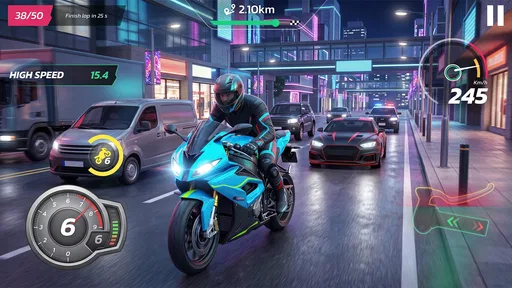
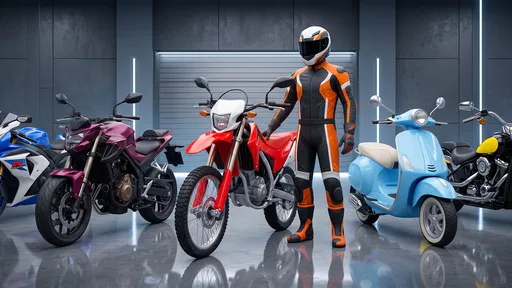
 Analysis by AppCompare
Traffic racing games are easy to understand and surprisingly difficult to judge fairly. A motorcycle, a road, moving vehicles, and the need to react quickly can create an enjoyable few-minute break, but the experience depends heavily on how clearly the game communicates what to do. I spent time with Ultimate Rider:Traffic Bike 3D to see whether its simple premise works beyond the first launch, especially for players who want a lightweight simulation game rather than a complicated racing package.
My overall impression is that this is aimed at quick sessions. It presents itself as a traffic motor-racing game built around multiple scenarios, and that focus gives it an approachable feel. You do not need to learn a large fictional world or understand a long list of racing rules before starting. The appeal is immediate: get into the traffic, judge openings, and try to maintain control. That simplicity is also the main trade-off, because players expecting a deep career structure or the polish of a major console-style racer may find the experience more limited.
Getting started without unnecessary frustration
The game comes from Happy Run and is listed as a free simulation title for Everyone. It has passed the million-install mark, which suggests that its straightforward traffic-riding idea has found a broad audience. It runs on Android 7.1 and later, and the current version is 1.2.5. Those details make it accessible to many older devices, although compatibility alone does not guarantee that every phone will deliver the same smooth experience.
My first practical recommendation is to treat the initial launch as a setup check rather than immediately judging the game. Close other demanding apps, make sure the device has enough free space for normal operation, and avoid testing it while the phone is already hot. A traffic game asks for quick visual decisions, so a phone struggling with background activity can make the controls feel worse than they really are.
Another useful check is to play a short session with the phone held in the position that feels most natural before changing other settings or blaming the game. Small changes in grip can affect how confidently you steer. If your thumb is covering too much of the screen, or if you are holding the device at an angle that makes the road harder to read, the first few attempts may feel unnecessarily awkward.
I also suggest restarting the game after an update or after a long period of suspended use. That is not a special feature of this title; it is simply sensible maintenance for any mobile game. If the first launch appears slow, a clean restart can separate a temporary startup problem from a consistent performance issue. The current release is 1.2.5, so keeping the installed build current is a reasonable first step when something behaves unexpectedly.
Where new players usually get stuck
The biggest early obstacle is not understanding the broad objective. It is learning the rhythm of traffic. A player may see an open lane and move toward it, only to discover that the next decision arrives quickly. I found that the safest approach is to look farther ahead than the motorcycle itself. Instead of reacting only to the vehicle directly in front, scan the next group of cars and decide whether a lane change will still leave room after the immediate opening disappears.
Worth Reading Before You Choose

EA SPORTS FC Mobile 26 Is a Bigger Football Game, but It Takes Time

Flipboard Shows What News Apps Must Do Beyond the Feed

Switching to Android Auto Means Rethinking Your Driving Routine

Google Calendar Makes a Crowded Week Easier to Manage

Ludo King Makes the Most of the Minutes Between Plans

Baby Panda World Brings Quick Play to Modern Phones, but Its Game Library Feels Busy
This changes the game from frantic swerving into a small planning exercise. It also helps reveal whether a mistake came from the control response or from a rushed decision. If you repeatedly move toward every visible gap, the traffic pattern will feel chaotic. If you wait briefly and read the next section of road, the same situation becomes more manageable.
Players can also get stuck because they expect every scenario to reward speed in exactly the same way. In a traffic-focused game, surviving a crowded section may matter more than making the most aggressive move. I would begin with controlled runs, using them to learn how quickly the road develops, before trying to push for a more daring pace.
One non-obvious tip is to use the first attempts as observation runs. Do not treat every early failure as wasted progress. Notice where traffic becomes dense, whether your attention drops after a long straight section, and which type of movement causes you to lose control. This approach is particularly useful on a small screen, where visual overload can arrive before the player notices it.
How I would organize a short play session
For a quick break, I would use a three-stage routine. First, play one cautious run to settle into the controls. Second, repeat the same kind of scenario while focusing on looking ahead. Third, make one deliberate attempt to improve a specific habit, such as changing lanes less often or leaving more space around traffic. This is more productive than restarting immediately after every mistake without identifying what went wrong.
The multiple-scenario structure is useful here because it gives the game more variety than a single repeated road. I would not assume that every scenario will suit every player equally. Some people enjoy the pressure of dense traffic, while others prefer a calmer route that allows them to concentrate on steering. The practical way to decide is to test each available situation with the same controlled approach rather than judging the game from one difficult attempt.
There is also a benefit to playing in short sessions instead of treating the game like a long racing marathon. Traffic games depend on attention, and repeated near-misses can make a player tense. When that happens, reactions usually become less accurate. A brief pause can be more helpful than forcing another run while frustrated.
Recovering when a run or launch goes wrong
When the game does not respond as expected, I would first separate a failed run from a technical problem. A crash, frozen screen, missing response, or unusually poor performance should be handled differently from simply colliding with traffic. Restart the game once, then try a short session without other demanding apps running. If the problem disappears, it was likely temporary device pressure rather than something that needs a complicated fix.
If the game repeatedly stops during startup, check the basic conditions: the operating system should meet the Android 7.1 requirement, the device should have room to operate normally, and the phone should not be overheating. I would also avoid repeatedly tapping the screen while waiting for a slow launch, since that can make it harder to tell whether the game is loading or has actually stopped responding.
For control problems, test one change at a time. Hold the device more steadily, clean the screen, and try again without changing several habits at once. If you alter your grip, playing position, and other device settings together, you will not know which change helped. A simple one-variable approach is boring but effective, especially when the issue appears only during fast traffic sections.
Another recovery technique is to lower your ambition for one run. If you are trying to maintain maximum speed while making constant lane changes, switch to a survival-focused attempt. Leave more space, make fewer movements, and watch whether the game becomes predictable again. This can reveal whether the problem is poor control feedback or an overly aggressive play style.
I would not recommend spending money simply to solve a temporary performance or learning issue. The game is free to download, but it includes optional in-app purchases ranging from $2.49 to $184.99 per item. That is a wide range, so I would treat purchases as a separate decision from troubleshooting. First establish that the game runs properly and that you actually enjoy its traffic-riding loop. Paying before answering those questions does not make the controls clearer or the phone faster.
When the app may not be the cause
A mobile racing game can feel inconsistent when the real problem is the device environment. Heat, low battery, background activity, or a crowded storage situation can all affect how comfortable a fast game feels. I am not saying every issue comes from the phone, but it is worth checking these ordinary causes before deciding that the game itself is broken.
Touchscreen feel is another variable. A thick screen protector, damp fingers, or a dirty display can make quick movements less reliable. In a traffic game, a missed touch is especially noticeable because the mistake happens at the exact moment a gap closes. Clean the display and try a calmer run before drawing a final conclusion about the control design.
Attention matters more than many players expect. If you are playing while walking, riding in a vehicle, or dealing with frequent notifications, the road will seem harder to read. I would use this game when stationary and able to concentrate for a few minutes. That is not only safer; it also gives the game a fairer test.
Network conditions may also be blamed too quickly for an issue that is actually local to the device or the current session. Since the core appeal is the on-screen traffic challenge, I would begin by checking launch behavior, touch response, and performance in a quiet environment rather than assuming every interruption has the same cause. Keeping the diagnosis simple prevents unnecessary changes.
What makes it useful compared with familiar alternatives
Compared with a full racing simulator, this game is easier to approach. You can focus on traffic judgment rather than learning a detailed vehicle setup or committing to a long event. That makes it a better fit for someone who wants a quick challenge during a spare moment. It is also more direct than many open-world driving games, where reaching the activity can take as much time as the activity itself.
On the other hand, players who want deep tuning, a large story, or a carefully structured competitive career should look toward a more substantial racing alternative. The traffic-riding concept is the center of the experience here, so the game’s value depends on whether repeating that kind of challenge remains enjoyable for you. I would choose this title for immediacy, not for a broad collection of racing systems.
It can also suit younger players because the content rating is Everyone, but the age rating should not be confused with unlimited suitability for every child. Fast visual movement can be tiring, and optional purchases deserve adult attention on a shared device. I would let a child try the free experience first and explain that purchases are not required simply because they appear in the game.
For adults, the strongest use case is a short mental reset. A commute break, a few minutes after finishing work, or a quick distraction while waiting can all fit the design better than a long evening session. The game asks for attention without requiring a large time commitment, although players who dislike repeated traffic decisions may find that the simplicity becomes repetitive.
Who should install it and who should skip it
I would recommend it to someone who likes motorcycle traffic challenges, prefers simple controls, and wants a free simulation game that can be understood quickly. It is also a reasonable choice for an older Android phone that meets the minimum operating-system requirement, provided the device is kept in good condition and the player is comfortable with a straightforward experience.
I would be more cautious if you are looking for realistic bike handling, extensive customization, or a long-term progression system. Nothing about the central concept suggests that traffic riding is merely a small part of a much larger racing package. If your enjoyment depends on detailed vehicle management, online competition, or a cinematic campaign, another category of racing game will probably serve you better.
I would also skip it if you dislike in-app purchase prompts or prefer games with one clear upfront cost. The free entry is helpful, but the presence of purchases from $2.49 to $184.99 means you should review any confirmation carefully before buying. My advice is to play without spending first and decide whether the basic loop has enough variety for your habits.
My practical verdict
After using it as a short-session traffic racer, I see Ultimate Rider:Traffic Bike 3D as an accessible choice rather than a complete replacement for a deep racing simulator. Its strongest quality is the directness of the idea: the player can quickly get into a road situation and concentrate on reading traffic. The multiple scenarios give that premise some needed variation, while the Everyone rating and broad Android compatibility make it approachable for a wide audience.
The main limitation is equally clear. The experience lives or dies by how much you enjoy repeating traffic decisions. If you need a large progression system, advanced bike management, or a richer competitive structure, the game may feel too narrow. I also think new players should give themselves time to learn the traffic rhythm instead of judging it after one rushed attempt.
My final advice is to install it with modest expectations, test it in a cool and distraction-free setting, and use the early runs to learn rather than chase immediate perfection. Keep purchases separate from troubleshooting, check the device basics if performance feels strange, and decide based on whether the simple road challenge remains fun after the novelty fades. For a free, quick motorcycle simulation from Happy Run, that is a fair reason to try it; for a serious racing enthusiast, it is better viewed as a compact side game than a full driving destination.
Pros
- Simple controls make it easy to start riding quickly.
- Short races are suitable for quick gaming sessions.
- Traffic-filled roads create a constant sense of challenge.
- 3D environments provide a more immersive riding experience.
- Progression encourages players to improve their driving skills.
Cons
- Gameplay can become repetitive after extended play.
- Frequent traffic collisions may feel frustrating for beginners.
- Some upgrades or content may require in-app purchases.
- Graphics may look dated on newer high-resolution devices.
- Ads can interrupt the experience between races.
FAQs for Ultimate Rider:Traffic Bike 3D
What is Ultimate Rider: Traffic Bike 3D?
Ultimate Rider: Traffic Bike 3D is an arcade-style motorcycle game focused on riding through busy roads while avoiding cars, buses, and other traffic. The main appeal is its straightforward gameplay: accelerate, steer between vehicles, and try to travel as far as possible without crashing. It is designed for short, fast sessions rather than a realistic motorcycle simulation.
How do you play Ultimate Rider: Traffic Bike 3D?
Gameplay generally involves controlling the motorcycle with on-screen steering or touch controls while managing speed and positioning in traffic. Players need to react quickly, find safe gaps, and avoid sudden collisions. Depending on the selected mode or progression system, distance, score, coins, or completed objectives may be used to unlock upgrades or improve the riding experience.
Does Ultimate Rider: Traffic Bike 3D work offline?
The game may be playable without a continuous internet connection because its core traffic-riding experience does not require online multiplayer. However, some features can depend on connectivity, including advertisements, optional rewards, analytics, updates, or store-related content. It is best to launch the game once while connected, then test offline play on your specific Android or iOS device.
Is Ultimate Rider: Traffic Bike 3D free to download?
Ultimate Rider: Traffic Bike 3D is typically offered as a free download, allowing users to install and try the main gameplay without an upfront purchase. Free games commonly include advertising and may offer optional in-app purchases, such as removing ads, obtaining currency, or improving motorcycles. Check the official store listing carefully for the current pricing and purchase details.
Is Ultimate Rider: Traffic Bike 3D suitable for children?
The game is generally easy to understand because it focuses on motorcycle riding, traffic avoidance, and score chasing rather than complex controls or mature storytelling. Nevertheless, parents should review the age rating, advertising policy, and any in-app purchase options before allowing children to play. Fast traffic movement may also make the game more appropriate for older children and casual players.


